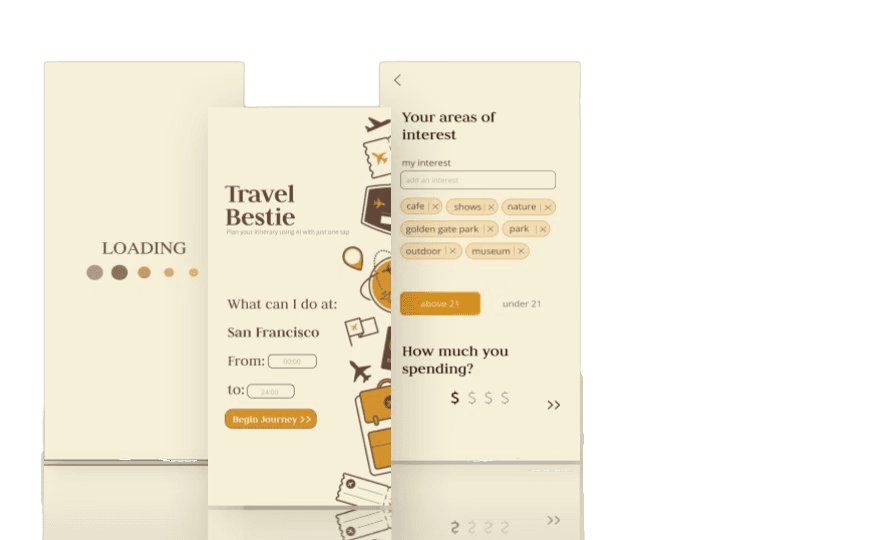
Travel Bestie: AI Itinerary for You

Deploying a Travel Planner that cut user planning time using AI-generated suggestions based on Yelp and user preferences

Project Type

Hackathon · AI Integrations · Frontend Dev

Duration

48 hours

TOOLS

Figma, React.js, APIs

My Roles

Design

Frontend

Team

Jonathan Morris

Ojal Mapuskar

Me

Context

2023 ACM x Grace Hackathon @UCSC

As a designer, I'm always looking for events to attend and grow my skills.

Knowing my friends are going, I attended this 200+ participant hackathon to support them. 48 hours later, I ended up winning 1st place with the app me and my team deployed.

As a designer, I'm always looking for events to attend and grow my skills.

Knowing my friends are going, I attended this 200+ participant hackathon to support them. 48 hours later, I ended up winning 1st place with the app me and my team deployed.

As a designer, I'm always looking for events to attend and grow my skills.

Knowing my friends are going, I attended this 200+ participant hackathon to support them. 48 hours later, I ended up winning 1st place with the app me and my team deployed.

Problem

It's hard to make travel plans

Ever spent hours planning a trip… just to give up halfway? (or your friends dipped on you and the plan never made it out of the chat)


Ever spent hours planning a trip… just to give up halfway? (or your friends dipped on you and the plan never made it out of the chat)


Ever spent hours planning a trip… just to give up halfway? (or your friends dipped on you and the plan never made it out of the chat)


Solution

Skip the hassle of planning & scheduling

Travel Bestie is an AI-powered itinerary builder that plans your trip in seconds based on your preferences.

Built using OpenAI + Yelp API + Bootstrap + React.

Discovery

Brainstorming and skill matching

We spent the majority of our 48 hours planning. It's our first time working together, so we spent a lot of time figuring out what was actually feasible based on our skill sets.

We identified key factors that influence travel planning:
✔️ Budget
✔️ Ratings
✔️ Activity Level
✔️ Distance

Ideas we were brainstorming
With limited time, we focused on speed over aesthetics, scribbling down ideas and structuring a rough user flow.

Design

Deciding on a flow

Since my teammates were handling backend integrations, I asked them to list the key API elements they could retrieve (e.g., ratings, stars, locations). I then used these inputs to shape the wireframes.

Elements to have on each screen; given to me from my teammates
Rough user flows
Refining the key screens
Gathering design references for UI consistency
1/ basic graphics w/ sliding numbers
2/ interactive animations
3/ colorful graphics
4/ no sliding numbers
High-fidelity screens

Finalized UX flow for handoff

Once the high-fidelity mockups were ready, I handed them off to my teammates.

Prototyped user flow

Development

Coding with React.js & Bootstrap CSS

Since I already made most of the designs in Figma, it was really simple to export the them into react using the Figma design to code option. I fine-tuned the layout with Bootstrap CSS, making sure the cards, alignment, and spacings are correct and look good on the landing and itinerary page

Deployed working code

Since the API calls are taking a long time, I also implemented a smooth loading animation using Bootstrap’s prebuilt elements. This made waiting easier.

Utilizing the "status" component animation
Loading animation

Conclusion

We won!

Out of 68 submissions, we were awarded Best Overall at the ACM x Grace Hackathon 2023!

Out of 68 submissions, we were awarded Best Overall at the ACM x Grace Hackathon 2023!

Out of 68 submissions, we were awarded Best Overall at the ACM x Grace Hackathon 2023!

winning best overall

Results

  • Functional app deployed in 48 hours

  • Full AI flow from prompt → plan → personalized results

  • Judges praised UI polish + clarity

Reflections

A short project like this one reminds me that execution > perfection. We had a lot of ideas that we still want to implement, but through scope and sticking with our design identity, we were able to push out a complete user experience.

The time constraint led to pressure, but it is also a lot of fun.

What's next?

  • Switch to React Native for better mobile development

  • Publish on app store

  • Make frontend responsive, not hard coded spacings

Baskin School of Engineer after we won